From model to app in an hour
EOModeller blog · post 003
We're about to start building a new house, and I wanted one place to organise all of the design information. Kind of like Jira for houses. Product specs are URLs, photos sit on two phones and a couple of laptops. And decisions are stored in notes and documents, we have a lot of ideas that we don't want forgotten about. I wanted one place to keep notes, images and attachments, organised the way the building is organised. This will form both a reference for us and a starting point for our architect.
So I built a web app to keep everything organised and in one place. It's called ArchiNote, and it took about an hour to go from nothing to a working app with a database, logins, file uploads and a test suite. I didn't write any of the code. What I did write was a model.
The interesting part isn't that AI wrote an app, but that I used a model as the specification, and AI got almost everything it needed from there. Instead of writing a detailed prompt I could express the entities and relationships visually.
Step 1: the model
I started in EOModeller with a class diagram.
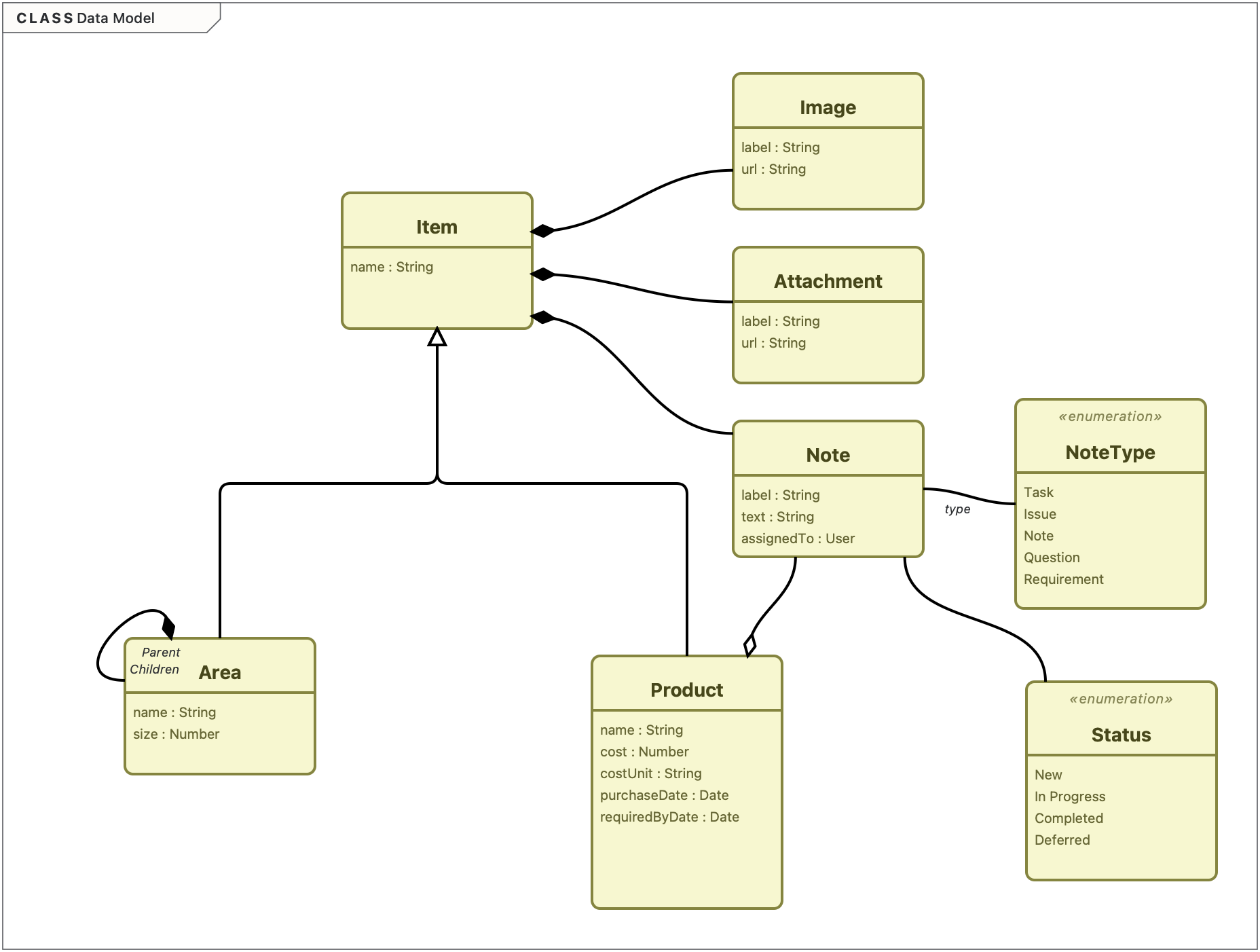
The structure is relatively simple, but it encodes a lot of information:
- An abstract Item with a name. Everything you can attach information to is an Item.
- Two specialisations. An Area has a size; areas nest, so a project is just the top-level area: House → West Wing → Library. A Product has a cost, a cost unit, a purchase date and a required-by date. Products exist in Areas.
- Items own their Notes, Images and Attachments by composition. Delete an area and its notes go with it.
None of this is sophisticated UML. But each element is typed, each relationship has a kind and a direction, and each multiplicity is stated. That this is data, accessible to an LLM is the difference between a model and a picture. I've written before that we create models for many reasons. This time one reason was very concrete: the model was the specification. Initially the reason I created the model was to understand the problem space.
Step 2: a few lines of text
The model doesn't say everything, so I wrote a short spec to sit beside it. It's about 120 words, and most of it is a list of decisions the model shouldn't express:
Web front end. Go backend. PostgreSQL database. Simple user account system with table in Postgres. Manual user add. Build and run locally.
I could have created a deployment diagram or similar to express this, but that would have taken longer than the short description.
There's a line on style ("Modern, formal style. I can update the css later.").
Then I exported the model as XMI and dropped it into the project's doc folder next to the spec.
Step 3: one prompt
This was the whole instruction:
Create a new web app called ArchiNote, all information is in the doc directory. This is a large task so you may want to split it into plan, design, implement, test steps or cycles. If unsure ask questions.
Claude read the spec and the XMI, and summarised the data model back to me correctly: Item as the base, Area and Product inheriting from it, Items owning Notes, Images and Attachments, Areas forming a tree. It then asked four questions:
- Which front-end approach?
- How should Postgres run locally?
- How should file uploads work?
- What did "manual user add" mean?
Each question came with a recommended answer. I took all four.
About half an hour later I had a running app. It's a single Go binary with htmx for the interactive parts and Postgres in a container. Notes, images and attachments are stored against any area or product. Products are inherited down the tree, and the Applies tick-boxes work. Accounts are created from the command line, and there are tests for both the data layer and the HTTP handlers. It even loaded a sample project so I had something to click around.
Step 4: small additions
Over the following days, as I used it, I asked for a handful of changes:
- A better image browser.
- A way to link a note on an area to a specific product in scope there.
- A filtered list of all notes.
- Open/close disclosure on the tree, which gets unwieldy quickly once a house has a few dozen rooms and products.
Each was a single sentence, and none needed rework.
When the model itself changed (notes gained a type and a status), I updated it in EOModeller and exported it again. The model stayed the source of truth, rather than something I drew once and left behind.
Deploying it to my home Kubernetes cluster took longer than building it, but that's a different story.
Why it worked
My prompt was not clever, or complex. It handed over almost all of the work. What made it work was that the input was unambiguous.
A prose description of a data model is full of gaps. Is a project a kind of area or something that contains areas? Can a note belong to a product as well as an area? What happens to the photos when a room is deleted? A picture of a diagram is barely better, because the reader still has to guess what the boxes and lines mean.
An XMI export answers those questions with detail and clarity. Generalisation says Area is an Item. Composition says the notes are owned and go when their owner goes. Multiplicities say how many. The structural decisions had been made, and made explicitly. I could have named the relationships, but since this is a simple app I wasn't concerned with that detail. All that was left was implementation, and implementation is now the cheap part.
What Claude did ask about was exactly what the model didn't cover: front-end technology, local infrastructure, file storage, authentication. The split between model and spec turned out to be the split between what I needed to decide and what I was happy to delegate.
This changes where an architect's effort goes. If an app can be generated in half an hour from a good model, then the time spent on the model is most of the work. The hour I spent was mostly thinking: about what an Item is, whether products belong to areas or merely apply to them, and what ownership means for deletion. That's the work architects should be doing, and a modelling tool should make it fast and keep it precise. The model was my way of communicating my requirements.
ArchiNote is a small app with one developer and a handful of users. Perhaps it is something that before AI we never would have considered building; the effort was too high. At one time this would have been something I would have built in an Access Database, or more commonly today as a spreadsheet. In my work I've seen many of these types of applications in large organisations, they are normally a nightmare for architecture as (in some but not all) organisations they slip outside formal agreed development and deployment processes. But they serve their purpose, do exactly what they need to do and are developed cheaply. Today with AI that is even more true. Nobody had to agree on anything, and a larger system brings integration, migration and all the decisions this one let me skip. But the pattern scales in the direction that matters: the more precisely you've modelled, the less there is to get wrong downstream, whether it's a person or an AI doing the downstream work.
The model used to be documentation that drifted from the code. Here, it came first and the code followed.
EOModeller exports UML 2.5.1 XMI from any model — get started.